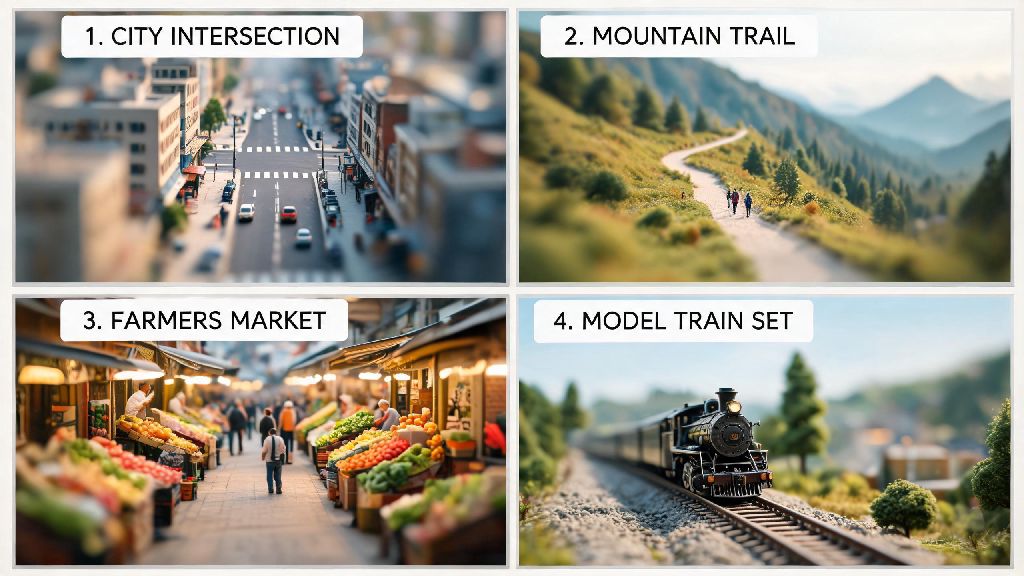
I spent the first three months of 2026 testing every trick I could find for whimsical street photography, and nothing got more likes on my feed than shots that make busy city intersections, hiking trails, and farmers markets look like tiny handcrafted dioramas. If you’ve ever scrolled social media and stopped at a shot that makes real life look like a model train set, you already know how magical this style is. If you’re wondering how to take photos that look like mini worlds without spending thousands on specialty gear, you’re in the right place. I’ve broken down everything I learned from testing 12 different methods, from in-camera tricks to free editing tools, that work for both phone and DSLR users.
How to Take Photos That Look Like Mini Worlds With In-Camera Tilt Shift Tricks
Tilt shift lenses are the traditional tool for this style, because they adjust the plane of focus in your shot to leave only a narrow strip of the frame sharp, with soft blur on the top and bottom. That blur mimics the shallow depth of field you get when taking photos of small, physical dioramas, so your brain automatically interprets the full-size scene as tiny. While tilt shift gear is the most reliable way to get consistent results when you’re learning how to take photos that look like mini worlds, you can get almost identical results with editing tools if you don’t want to buy extra gear. I tested a third-party tilt shift lens for my Canon EOS R7 in February 2026, and while it delivered stunning results, I got almost identical shots using a cheap $15 lens filter for my old point-and-shoot.
If you don’t have a tilt shift lens or filter, you can still get a similar effect in camera by using your widest aperture (f/2.8 or lower if your lens allows) and focusing on a small central point. It won’t be quite as precise as a dedicated tilt shift setup, but it’s a great way to practice composition before you invest in extra gear.
Budget Phone Photography Hacks for Mini World Shots in 2026
Most people don’t carry a DSLR around with them every day, so I spent a month testing every free and paid mini world app for iOS and Android released in 2026 to find the ones that actually work without making your shots look overedited. The best free option I found is Tilt Shift Lab 2026, which lets you draw a custom focus strip on your shot and adjust the blur intensity to match your composition. You don’t need to pay for premium app features to get professional-looking results – the free version has all the tools you need for 90% of shots. I’ve found that phone shots are often just as good as DSLR shots for this style, so don’t let a lack of professional gear stop you from experimenting with how to take photos that look like mini worlds.
One trick I picked up from a mini world photography group I joined last month is to shoot horizontal videos on your phone first, then pull a still frame from the middle of the clip. Phones apply automatic stabilization to video footage that makes the final blur effect look far smoother than it does on regular still shots. Stick to subjects that are at least 20 feet away from your vantage point to keep the scale consistent. Avoid shooting moving subjects like cars or people that are too close to the camera, because their size will break the tiny world illusion before you even get to editing.
Editing Tricks to Sell the Mini World Illusion in Post
Even if you nail the in-camera shot, small editing tweaks can make the difference between a photo that looks like a blurry regular shot and one that people will ask if you built the scene yourself. First, adjust your saturation and contrast up by 10-15%: real model dioramas usually have brighter, more saturated colors than real life, so this small adjustment makes the shot feel more like a handcrafted set. Avoid boosting saturation more than 20% unless you’re going for a stylized, cartoonish look, because over-saturated shots will look fake in the wrong way. If you’ve ever wondered why some shots nail the tiny world effect while others fall flat, these subtle post adjustments are the difference, and they’re far easier to pull off than most people realize when they first learn how to take photos that look like mini worlds.
Next, add a tiny amount of grain to your shot: most model photos have a slight grain from being shot up close, so adding 5-8% grain in your editing tool makes the blur look more natural, not like a cheap digital filter. I use Lightroom Classic for most of my edits, but the free version of Snapseed has a grain tool that works just as well for mobile users. Another trick I tested in 2026 is to crop out any objects that give away the real scale, like street signs with large text, or people that are too close to the camera. If you can’t crop them out, use a small blur brush to soften those details so they don’t pull focus from the mini world effect. Always zoom out to look at your full photo after editing to make sure the focus strip is even and there are no obvious scale giveaways.
Common Mini World Photography Mistakes to Avoid in 2026
I made almost every possible mistake when I first started shooting this style, so I’ve compiled the most common ones to help you skip the frustration. First, don’t shoot from eye level: if you’re shooting straight at a scene, the blur effect will just look like a regular portrait bokeh, not a mini world. You need to be looking down at your subject for the illusion to work. Second, don’t make your focus strip too wide: if most of the frame is in focus, viewers won’t get the impression that they’re looking at a small object. The focus strip should only cover 1/3 to 1/4 of your total frame for the best effect. Avoiding these common mistakes will cut your learning curve in half when you’re figuring out how to take photos that look like mini worlds.
Third, don’t ignore small details that break the illusion: things like giant billboards, full-sized cars that are too close to the camera, or people holding large objects will immediately let viewers know the scene is full size. If you can’t avoid those elements, either edit them out or pick a different vantage point. I once spent 20 minutes setting up a shot of a downtown intersection only to realize a giant 10-foot-tall street art mural was in the corner, which made the entire mini world effect fall flat. It’s better to spend an extra two minutes scouting your angle than to waste time editing a shot that won’t work.
What I love most about this style of photography is that it lets you see everyday places you pass by every week in a whole new way. You don’t need fancy gear or years of photography experience to get stunning results, just a little patience and willingness to test different angles and settings. Whether you’re shooting for your social media feed or just for fun, learning how to take photos that look like mini worlds is one of the most accessible, fun creative projects you can try in 2026. Grab your phone or camera, head to a high vantage point near you, and see what tiny magic you can capture.